
Insights
FM Talk on the iPhone Duo: designing an app for a screen that bends
Xcode 27.1 beta with the Duo SDK landed on Sunday night. This week I have been adapting FM Talk, the news app I build for EMC Associates, for a phone with three layouts. What good layout means when the screen has a fold in it.
 Ryan Melling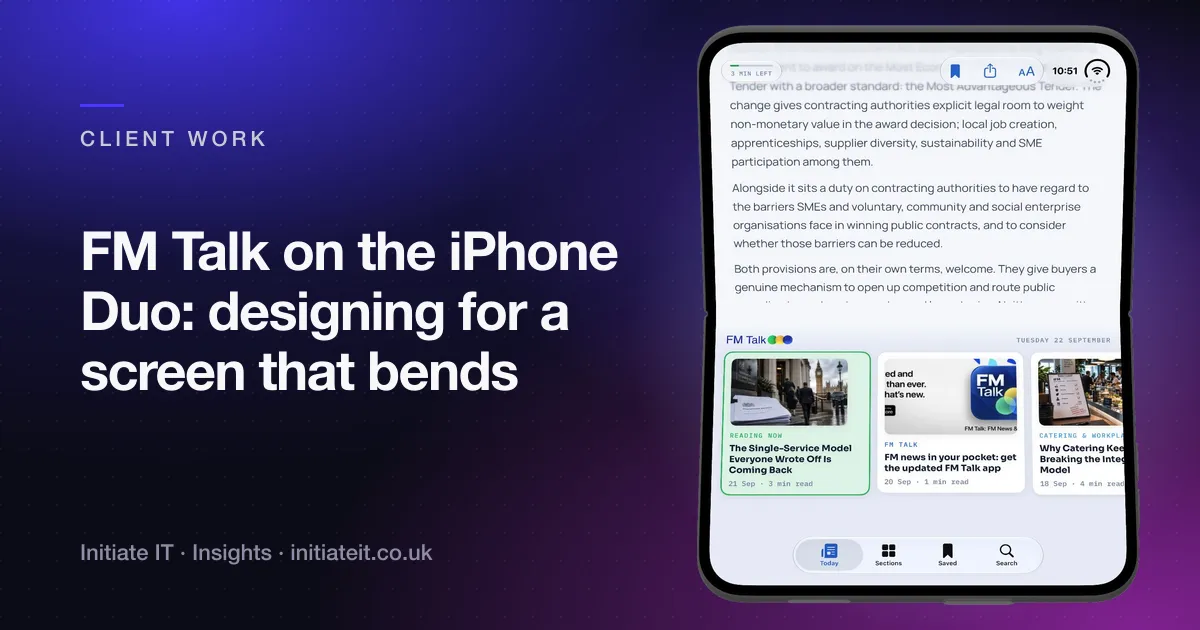
Short answer. Xcode 27.1 beta, the first with the iPhone Duo SDK, was released on Sunday 20 September at 8pm. A week earlier I had posted that Xcode did not support the Duo yet, so the timing was welcome. Since then I have been in the beta adapting FM Talk, the news app I build for EMC Associates, for a phone that has three layouts instead of one. The lesson from a week of testing is simple to state and slower to do: treat each fold state as its own design, not a variation of the phone layout.
What FM Talk is
EMC Associates are facilities management consultants. They publish a steady stream of FM news, analysis and practical insight, covering procurement, benchmarking, PFI contracts, catering and sustainability, and a lot of their readers are people who read on the move. FM Talk puts that in their pocket.
It is a free app for iPhone and iPad with no account, no paywall and no advertising. Open it and read. There is a daily Briefing and five topical sections, push notifications when something new is published, articles you can save for offline reading, search across the archive, reading-time estimates, adjustable text sizes and a dark mode. The updated version went live on 20 September with a redesigned front page, improved navigation and a proper iPad layout. It is on the App Store now.
EMC are also a client on the IT side, and I built their website. The app grew out of that: their content, their audience, and one person who already understood both.
Then the Duo SDK arrived
Apple’s folding iPhone is not out yet, but the tools for it are. The Xcode 27.1 beta adds the Duo SDK and a simulator that folds, and that is enough to do the real work before the hardware exists.
The question I kept coming back to while testing was this: what does a good layout even mean on a device that has multiple layouts?
A conventional phone has one. Tablets have two orientations. The Duo has at least three distinct states, and the hard part is that they are not three sizes of the same screen. They are three different objects.
Partially folded portrait, the hard one
Hold the phone half open, like a small laptop, and the screen is bent. There is a crease across the middle, and Apple’s guidance is clear: keep content out of the crease area. Simple to say. The obvious engineering move is to let the existing layout react to the geometry change and see where it lands, and I tried that first. It looks wrong the moment you actually hold it. Text runs across the fold, a card sits half on each pane, and the whole thing reads as an accident.
So the question becomes: what moves, and what stays? For FM Talk the answer that worked is below.
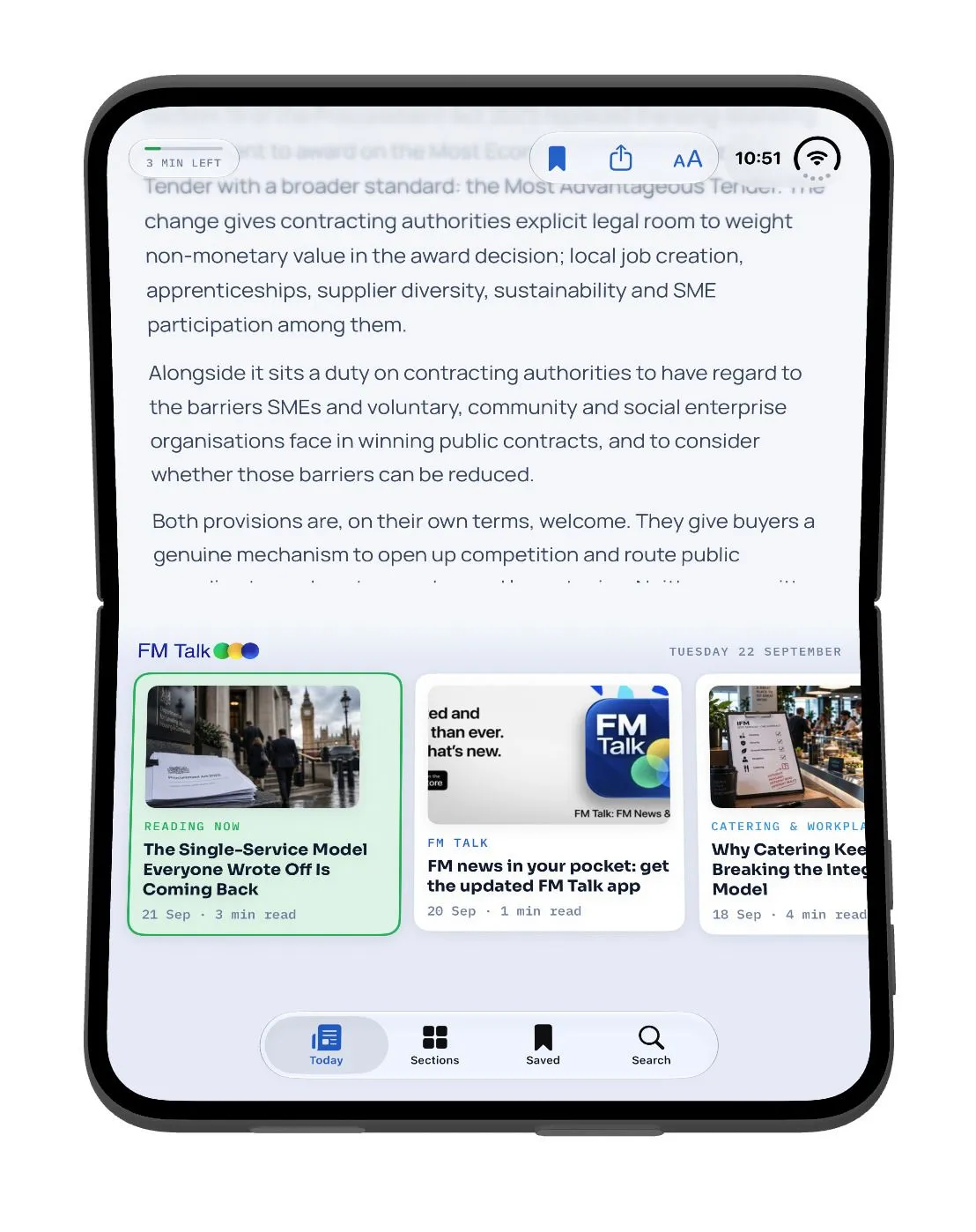
The article you are reading takes the top pane, flat and undisturbed, with the reading controls where your thumb is not. The bottom pane becomes the Today feed and the tab bar, so you can pick the next thing to read without leaving the current one. The crease becomes a natural division rather than a scar through the content.
That is not the phone layout adjusted. It is a two-pane design that happens to share components with the phone one.
Unfolded, and the temptation to stretch
Open the phone fully and you have something close to a small tablet in desktop mode. The easy path is to let everything stretch, tick the box and call the Duo supported. But that is not more usable, it is just wider. A reading column that spans the whole panel is worse to read than a narrow one, and a feed of cards that simply grows to fill the space gives you fewer things on screen, not more.
I am using the new layout options across the app so the reading experience improves when you open the phone rather than just getting bigger. The reading column keeps a comfortable measure. The space that opens up goes to the things that were cramped on a phone: sections, saved articles, search results alongside the article rather than instead of it. Unfolding should feel like a reward.
What it came down to
Each state is its own design. Closed is the phone app. Partially folded is a two-pane reader. Unfolded is closer to the iPad layout, tuned for the panel’s proportions. They share a design language and most of their components, but none of them is derived from another by stretching.
That is more work. I tried every shortcut in the other direction during the week, and every one of them looked like a shortcut the moment the simulator folded.
Nothing has shipped for the Duo yet, because the device has not. The layouts are built, tested in the beta, and ready for when it is. The updated FM Talk for today’s iPhones and iPads is live and free.
Why this matters to a small business
Most of the businesses I work with will never commission an app, and should not. But the Duo week is a useful reminder of two things about any software a business puts in front of its customers.
First, ship on what exists and design for what is coming. EMC’s readers get the updated app today; the Duo work costs them nothing and means the app will not embarrass them on launch day.
Second, the shortcuts show. Whether it is a website squeezed onto a phone or an app stretched onto a bigger screen, people can tell when a layout was not designed for the thing they are holding. It is the same reason I build websites by hand rather than from a template: the difference is visible, and it is the difference customers judge you on.
If you have an audience that reads on the move and content worth putting in their pocket, that is a conversation worth having. The app development page has the other apps and how a project runs. Get in touch and I will tell you honestly whether an app is the right shape or a good mobile website would do the job.
FAQ
Common questions
What is FM Talk?
FM Talk is a free iPhone and iPad app from EMC Associates, a facilities management consultancy. It delivers FM news, analysis and practical insight on procurement, benchmarking, PFI contracts, catering and sustainability, with a daily Briefing, five topical sections, saved articles for offline reading, search and reading-time estimates. No account, no paywall, no advertising.
Is FM Talk free?
Yes. There is no subscription, no paywall and no advertising, and you do not need to create an account. Download it, open it and start reading.
Will FM Talk work on the iPhone Duo?
That is what this week has been about. The layouts for closed, partially folded and unfolded states are built and tested in the Xcode 27.1 beta. Nothing has shipped for the Duo yet because the device has not, but the app will be ready when it is.
Do you build apps for other businesses?
For clients where an app sits naturally alongside their IT and website, yes. FM Talk grew out of the work I already do for EMC. I am not a software house, and I will say so if a project needs one, but a focused app for a business I already look after is squarely the kind of thing I take on.